Commando Game - Free Shooting Action in Your Browser
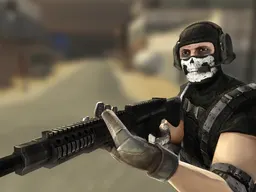
Commando Game is a free shooting game that runs directly in your web browser on desktop and mobile devices. You're dropped into combat scenarios with a single objective: eliminate every enemy in your path across 15 progressively challenging levels. Armed with multiple weapons and tactical options like grenades and crouching, you'll need quick reflexes and smart positioning to survive.
Quick Summary
Commando Game is a free shooting game that runs directly in your web browser on desktop and mobile devices. You're dropped into combat scenarios with a single objective: eliminate every enemy in your path across 15 progressively challenging levels. Armed with multiple weapons and tactical options like grenades and crouching, you'll need quick reflexes and smart positioning to survive. The game doesn't waste time on story—you spawn in, enemies appear, and you decide how to engage. The early levels teach you weapon handling and movement mechanics. By level five or six, enemy density increases and you'll face situations where running straight forward means getting pinned down. That's when you learn to use cover by crouching, switching weapons mid-fight, and throwing grenades to flush out clusters of opponents. The visual feedback is immediate: accurate shots land, grenades explode with clear blast radius, and enemies react realistically to taking fire.
Objective
Your mission is pure and uncomplicated: kill every hostile target in each of the 15 levels before they kill you. There's no negotiation, no secondary objectives, no puzzle-solving—just tactical elimination. Each level presents a new arena with different enemy placements and cover opportunities. You start with a primary weapon and can find or switch to alternate weapons scattered throughout the level. Some encounters pit you against small groups you can pick off from distance. Others fill the screen with enemies rushing from multiple angles, forcing you to decide between aggressive advance and defensive positioning. Clearing a level means confirming there are no enemies left alive. Fail to eliminate one and they'll hunt you down. Survive all enemies and you advance to the next level with new weapon options and tougher opposition.
Controls
The controls are built for both keyboard-and-mouse precision and mobile touch adaptation. On desktop, movement uses WASD or arrow keys to navigate your soldier in any direction. Left mouse button fires your current weapon—hold it for sustained fire or tap for controlled shots depending on your weapon. Right mouse button activates aiming mode, tightening your accuracy at the cost of movement speed. Space bar makes you jump, useful for crossing obstacles or dodging incoming fire. Tab pauses the action if you need a breather. Ctrl makes you crouch, lowering your profile behind cover and stabilizing your aim. Left Shift triggers a sprint, letting you move quickly between positions. G throws grenades, which are invaluable for clearing tight enemy clusters or flushing targets from strong defensive spots. On mobile, the layout adapts to touch input with virtual buttons positioned for thumb access, maintaining all the same functions without requiring external hardware.
Progression and Rewards
Commando Game structures your advancement through 15 distinct levels, each raising the bar on enemy count, positioning, and weapon complexity. You don't unlock cosmetics or skins—progression is pure mechanical challenge. Starting levels let you learn weapon behavior in relatively forgiving enemy densities. Mid-game levels introduce mixed enemy types and tighter arena layouts that punish careless movement. Late levels demand mastery of weapon switching, grenade timing, and positioning. The reward for clearing a level is immediate: you move forward, encounter new combat scenarios, and face stronger opponents. Your arsenal grows as you access more weapon types through your 15-level run. Some weapons suit long-range engagements while others excel at close-range suppression. Learning which weapon to deploy in each situation is the core progression loop—it's not about grinding or collecting, it's about building combat intuition.
Difficulty and Learning Curve
Commando Game starts forgiving enough that a new player can understand the basic loop in the first two levels. Your character responds immediately to input, shots land where you aim, and enemy patterns are readable. The first real difficulty spike hits around level four or five, where enemy density increases and arena layouts tighten. Players who've been running forward and spraying fire suddenly find themselves overwhelmed. This is the moment you discover that crouch works—enemies aim for center mass, and lowering your profile saves your life. The next jump comes when grenades become essential rather than optional. Early levels let you win through firepower alone. Later levels include enemy clusters positioned so tightly that you must throw grenades to break their formation, or accept taking heavy damage. Final levels combine high enemy counts, aggressive positioning, and weapon scarcity, demanding you make every shot and grenade count. The curve climbs steadily rather than spiking unpredictably, giving players time to adapt between difficulty jumps.
On Mobile and Desktop
Commando Game runs on both desktop browsers and mobile devices with a responsive design scaled to 960 by 600 pixels. On a computer, you get precision aiming with mouse control and dedicated keys for every action. The keyboard layout feels natural if you've played any WASD-based shooter. On mobile, the game shrinks to fit your screen without scaling down the playable area—enemies are still visible and targetable, just rendered smaller. Touch controls replace mouse aiming: tap where you want to shoot and your soldier fires. Swiping across the screen steers your character. The pause button and grenade throw are accessible through prominent touch zones positioned for easy thumb reach. Both versions run at the same speed with identical level layouts and enemy placement. The experience differs in feel rather than in challenge or content—desktop players enjoy higher precision, mobile players enjoy portability. You can start a level on your phone and finish on your computer without losing progress, provided you're playing through the same browser session.
For Whom Is This
Commando Game appeals to players who enjoy shooting mechanics without excess complexity. If you've played or enjoyed arcade-style shooting games, tactical military titles, or even action platformers, this game speaks your language. It's for people who want to jump into combat immediately without sitting through cutscenes or unlock trees. It works for afternoon breaks—15 levels means you can finish a run in 30 to 60 minutes depending on difficulty and skill. It's also forgiving enough for younger players and newcomers to shooting games who want to practice aiming and positioning. Conversely, it challenges experienced players through tight level design and enemy intelligence that requires smart weapon selection and movement. You don't need to download anything or sign up for an account. Load it in any browser and start fighting. The game runs free with no paywalls blocking levels or weapons, so your progression depends entirely on skill and learning.
Controls
Keyboard and mouse
- WASD or Arrow Keys - Move in any direction
- Left Mouse Button - Fire weapon
- Right Mouse Button - Aim (steadies aim but reduces movement speed)
- Space Bar - Jump over obstacles
- Ctrl - Crouch behind cover
- Left Shift - Sprint for quick repositioning
- G - Throw grenade
- Tab - Pause game
Touch
- Tap on screen - Fire at that location
- Swipe left or right - Move horizontally
- Swipe up or down - Move vertically
- Hold tap - Sustained fire
- Crouch button - Lower your profile for defense
- Grenade button - Throw grenade at target area
- Pause button - Pause game
FAQ
- Do I need to download anything or create an account?
- No. Commando Game runs directly in your web browser. Open the page, click play, and you're in combat within seconds. No downloads, no installation, no account required. You can close the browser and return later—your level progress is tracked during each session.
- How do I clear a level?
- Eliminate every enemy in the arena. There's no time limit and no hidden objectives—just confirm all hostiles are dead. Once the last enemy falls, the level automatically clears and you advance to the next one.
- What happens when I run out of ammo?
- Your weapons draw from a shared ammo pool that respawns during levels. If you're critically low, switch to a grenade throw or find a weapon pickup if one appears in the arena. Running completely dry forces you to rely on melee or grenades, but this situation is rare in normal play.
- Can I play this on my phone?
- Yes. The game is optimized for mobile browsers and adapts to touchscreen input. The layout and controls scale to your device while keeping all 15 levels and weapons intact. Performance is smooth on modern phones and tablets.
- What's the best weapon to use?
- It depends on the situation. Weapons suited for distance work poorly against close-range rushes, and vice versa. Your first weapon usually handles early levels fine. As you advance, mixing weapons between engagements—switching to a short-range option when enemies close in, then back to long-range when you need space—is the key to surviving later levels.
- Is there a time limit for each level?
- No time pressure. You can take as long as you need to clear enemies. This lets you play methodically or aggressively depending on your style. The only pressure is incoming enemy fire.
- How many levels are in the game?
- Exactly 15 levels. Each one escalates the challenge through enemy count, positioning, and available weapon variety. Completing all 15 is the end goal.
- Can I restart a level if I die?
- Yes. When enemies kill you, you respawn at the level start. You can attempt it as many times as needed. There's no limit to retries, so persistence and learning from mistakes is always rewarded.
Similar games
More Shooting Games games →