Car Parking Pro
Car Parking Pro is a free 3D parking and driving game that runs in your browser on desktop and mobile devices, where you complete parking challenges with customizable cars, trucks, buses, and trailers across multiple game modes and difficulty levels.
What Is This Game
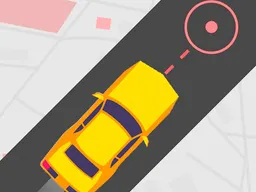
Car Parking Pro drops you into a 3D parking simulator where your job is straightforward: get vehicles into tight parking spaces without crashing. The game isn't about speed or racing—it's about precision, timing, and understanding how different vehicles handle. You start by picking a car, then you're placed in a parking lot where you need to maneuver into a marked space. The camera can switch between exterior and interior hood views, which changes how you read the environment and adjust your angles. Beyond standard cars, you'll unlock challenges that require parking buses, trucks, and trailers, each with completely different handling characteristics. A bus pivots differently than a sports car. A trailer adds a second layer of complexity to your steering inputs. The game splits into several progression paths: Career mode and Impossible mode, each with five seasons of escalating difficulty, plus a Rush mode where time pressure adds another layer. Before each parking attempt, you can customize your vehicle's body color, rim style, caliper color, and upgrade performance stats. The parking sensor feature helps you gauge distance to obstacles, though relying on it too much will slow your completion times.
Is It Worth Playing
Car Parking Pro works if you're drawn to puzzle-like challenges that require spatial reasoning rather than reflexes. The appeal isn't in flashy action—it's in that moment when you nail a tight parallel park on the first try after three failed attempts. The vehicle variety keeps the core loop fresh; parking a standard sedan feels completely different from reversing a truck with a trailer attached. The customization system is cosmetic and performance-based, so upgrading your car actually changes how it responds to your inputs, not just how it looks. If you've played other parking simulators or enjoyed GTA's driving mechanics but found the combat shallow, this strips away everything except the driving and parking, which is either exactly what you want or not your speed at all. The offline nature is genuinely useful—you're not waiting for servers or watching mandatory ads to continue. The progression system with five seasons in two modes means there's enough structure to push toward specific goals without the grind feeling endless. However, if you need fast-paced action or multiplayer competition, this isn't it. You're parking a car repeatedly, and that's the entire game. That focus is what makes it work for its audience.
How to Get Started
Launch the game in your browser and you'll immediately see a garage screen where your first vehicle waits. The game onboards you directly into your first parking challenge without lengthy tutorials or story sequences. You pick your car and spawn into a parking lot with a clear marker showing where you need to park. Your goal area is highlighted, and the game gives you boundaries—hit them too many times and the attempt fails. Each challenge has a par time and star ratings based on how cleanly and quickly you complete it. Early challenges are generous with space; they're teaching you how to read angles and anticipate where your car will go when you turn the wheel. By your third or fourth attempt, the game stops holding your hand. Spaces get tighter, obstacles multiply, and the vehicles get harder to steer. The Career mode serves as the main progression spine—complete levels to unlock new vehicles and move to the next season. Impossible mode is exactly what it sounds like: challenges designed to frustrate you until you master the mechanics. Rush mode adds a timer, forcing you to balance precision with speed. You can restart any challenge instantly without penalty, which is crucial because parking games live or die on how quickly you can attempt again after failing.
Controls
The game uses standard driving controls adapted for parking precision. On desktop with keyboard, you use arrow keys or WASD to move forward and backward, turn left and right, and reverse. Steering is digital rather than analog, so you're making sharp input decisions rather than feathering a controller. The mouse or spacebar typically handles camera switching between the exterior wide view and the interior hood view, which is essential because different camera angles give you different information about your distance from obstacles. On mobile devices, you get a virtual joystick for movement and turning that appears on screen. The joystick registers swipes and taps, letting you push forward, reverse, and rotate the steering. Camera switching on mobile is a separate button overlay. The controls are responsive enough that your failures come from misjudging angles, not from the input lag. However, because steering is fully digital and not progressive, there's a learning curve to understanding how much lock you need and when to countersteer. Many new players oversteer in tight spaces because they're holding the turn button too long, expecting analog control.
What Changes Over Time
Early levels teach you the basics with single-car challenges in open spaces. As you progress through seasons, the game introduces variables: multiple obstacles in the same lot, tighter spatial constraints, and different vehicle types with entirely different physics. When you unlock the bus, you suddenly can't just point and drive—the wheelbase is long, the turning circle is massive, and reversing into a space requires planning three moves ahead. The trailer adds a jack-knife mechanic to your mental model. Your customization options expand as you unlock new cars and visual parts, so your garage grows beyond the starter vehicle. Performance upgrades like acceleration and handling actually matter as spaces get tighter and time pressure increases in Rush mode. By the later seasons, you're not just parking; you're managing a vehicle that behaves like its real-world counterpart. The difficulty curve isn't sudden—the game respects your learning, gradually introducing complexity. However, there's a wall moment around mid-Career where spaces tighten enough that casual parking technique stops working. That's when most players either accept the learning curve or move on. Those who push through that wall suddenly understand the game's depth.
Mistakes That Cost You
Hitting obstacles loses you attempts and multiplies your star rating penalty. The game counts collisions, so a clean park worth three stars becomes a one-star clear if you bump the curb twice. This teaches you to slow down and be deliberate rather than rushing through spaces. Relying entirely on the parking sensor creates bad habits—you learn to trust the sensor rather than developing a feel for your vehicle's size and turning radius, which hurts you in later levels where you need spatial awareness beyond beeping feedback. Overfamiliarizing yourself with one camera angle is another trap. The exterior view gives you better perspective on spacing but worse on alignment with markers. The hood view does the opposite. Players who refuse to switch cameras hit invisible walls in narrow challenges. Ignoring vehicle handling differences kills your momentum. Parking a sports car the same way you'd park a truck leads to failed attempts until you adjust your approach. The game doesn't punish you with timers or lives lost, but your progression through star ratings slows dramatically if you're not adapting strategy per vehicle. Finally, not upgrading your car when available can make later challenges unnecessarily brutal. Performance matters, and some levels are tuned assuming you've invested in improvements.
Where and What Device to Play On
Car Parking Pro runs directly in your web browser on any device with a stable internet connection for the initial load. After installation, it works completely offline, which is genuinely useful if you're on a commute or area with spotty connectivity. On desktop, you get the full experience with mouse and keyboard controls optimized for precision steering. The camera switching is more intuitive on a larger screen, and the visual detail of the 3D parking lots is crisper. On mobile phones and tablets, the game adapts to touch controls with the virtual joystick and camera button overlay. Tablet play is generally smoother than phone play because you have more screen real estate for the control overlay, but both work. The 800x600 base resolution scales up on modern high-resolution screens, so you're not stuck looking at blurry graphics. Browser performance matters here—if your device struggles with 3D graphics, the game can stutter, especially in parking lots with many obstacles. The lack of cloud save means your progress stays local to that browser or device. If you clear your browser data or switch devices, you'll start over. That's a significant limitation if you're a player who bounces between desktop and mobile, so understand that commitment before you invest hours into unlocking later seasons.
Controls
Keyboard and mouse
- Arrow Keys or WASD - Move forward, backward, turn left and right
- Mouse or Spacebar - Switch camera views between exterior and interior hood perspective
- Shift or designated button - Reverse (if separate from directional input)
Touch
- Virtual Joystick - Tap and drag to steer forward, backward, and rotate steering
- Camera Button - Tap to switch between exterior and hood camera angles
- Restart Button - Tap to reset current parking attempt
FAQ
- Is Car Parking Pro actually free?
- Yes, it's free to play in your browser. There's no upfront cost or subscription. The game doesn't require you to watch ads to keep playing, though cosmetic upgrades might have in-app purchases available. You're not locked out of content for being free-to-play.
- Do I need to download anything to play?
- No download necessary. It runs directly in your web browser. You can start playing instantly from any device with a browser. After your first session, the game caches locally so it works offline, but the initial launch happens through the browser.
- How long does it take to unlock the bus and truck?
- The exact progression timeline depends on how many stars you earn in Career mode, since vehicle unlocks are tied to advancement. Early levels don't have buses—you need to push through several seasons before those vehicles appear as challenges. There's no set number of hours; it depends on your skill and how many attempts you need per level.
- What's the difference between Career mode and Impossible mode?
- Career mode is the main progression with gradually increasing difficulty across five seasons. It's designed to teach you the game. Impossible mode is a separate challenge path with the same five-season structure but designed for players who've already mastered the basics. Both offer different parking challenges and vehicle variety. You can play either one at any time.
- Can I pause and come back to my progress later?
- Yes, your progression saves locally. Close the game and come back whenever you want—your unlocked vehicles, customizations, and completed levels stay in your browser data. Just don't clear your browser cache, or you'll lose everything.
- Why do I keep failing the same parking space?
- Tight spaces require understanding your vehicle's turning radius and wheelbase. Try switching camera angles to get a better view of your alignment. Slow down and use smaller steering inputs rather than holding the turn button. If you're in a larger vehicle like a bus or truck, the physics are completely different from the starter car—the turning circle is much wider, and reversing requires more planning.
- Does this game work on my phone and tablet?
- Yes, it works on any device with a modern web browser. The touch controls adapt to screen size. Tablets give you more space for the control overlay, making it easier to steer precisely. Mobile phones work too, though the smaller screen takes adjustment.
- If I delete the game, do I lose my progress?
- Yes. There's no cloud save feature, so all progress, unlocks, and customizations are stored locally on your device. If you clear your browser data or uninstall the game, everything is gone. Make sure you're committed before you sink hours into it.
Similar games
More Hypercasual Games games →