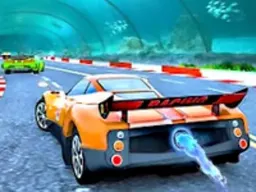
Car Parking
Car Parking is a free parking simulation game you can play right now in your web browser on desktop or mobile, where you drive a car through tight spaces and navigate challenging parking scenarios.
About the Game
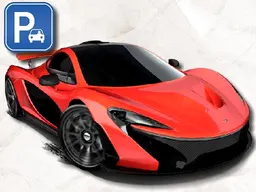
Car Parking puts you behind the wheel with one straightforward objective: get your vehicle into the parking spot. The game combines the precision of a parking simulator with arcade-style driving mechanics. You're given a car on a road or lot, and you need to navigate it into designated parking areas, often with obstacles, tight spaces, or tricky angles to work with. The graphics are clean and bright, making it easy to see what you're doing as you maneuver. Unlike racing games that focus on speed, Car Parking emphasizes control and spatial awareness. You'll find yourself thinking about angles, distance, and timing rather than just mashing the accelerator. It's the kind of game that feels simple in concept but gets trickier as scenarios become more demanding. The difficulty ramps up naturally as you progress through different parking challenges, keeping things fresh without overwhelming you immediately.
How to Play
When you start Car Parking, you'll see your car positioned on a road or in an open lot with a target parking space somewhere ahead or to the side. Your job is to drive the car to that space and position it correctly. The game gives you control over acceleration, braking, and steering, and you'll need to use all three to pull off a successful park. Early levels might just ask you to drive straight into an obvious spot, but soon you'll encounter scenarios where the parking space is at an awkward angle, blocked by other cars, or positioned in a tight corner. You can't just ram your way in because the game registers when you hit obstacles or go out of bounds. Each attempt resets you, so precision matters. The satisfaction comes from that moment when you line up perfectly and ease into the spot without touching anything. You advance by completing parking challenges, and the game introduces new layouts and complications as you go further.
Controls
Car Parking keeps the control scheme simple so you can focus on driving. On desktop, you use the arrow keys: press up to accelerate forward, down to reverse, left to steer left, and right to steer right. It's the classic directional input that works well for this type of game. If you're playing on a mobile device, the controls adapt to touch. You'll typically see directional buttons on screen that work the same way as the arrow keys, or you might get a virtual joystick depending on how your phone displays the game. The beauty of these controls is that they're responsive enough to make precise movements feel doable. You're not fighting against lag or dead zones when you're trying to ease into a tight spot. The steering responds immediately to your input, which is essential when you're millimeters away from clipping a parked car.
Tips for Scoring Higher
The first rule of parking is to go slowly. Players who rush tend to bump obstacles and fail immediately. Take your time lining up the angle before you move. Look at where the parking space is and plan your approach. If it's at an angle, you'll need to come in from a direction that lets you straighten out. Study the space for a moment before you touch the controls. Use reverse strategically. Sometimes driving forward into a spot is impossible because of the angle. Backing in might be your only option, or you might need to go forward, stop, reverse, and adjust multiple times to position correctly. It's slower but often more reliable. Smooth inputs beat jerky corrections. When you're steering into the final position, small touches of the arrow keys work better than holding them down. This kind of precision driving is how you avoid those last-second collisions that waste your attempt. Remember that failed attempts reset you to the starting position, so there's no penalty for trying again. Use each attempt to learn the space a little better.
Advanced Moves
Once you've got the basics down, parking becomes a puzzle of geometry and timing. The advanced technique is the multi-point turn, where you use forward-reverse-forward combinations to rotate your car into tight spaces without leaving the lot or hitting boundaries. This is essential for parking spots positioned perpendicular to your starting direction. Another move experienced players master is the feathered approach, where you accelerate slightly, let off, accelerate slightly again. This gives you fine-grained speed control as you're threading into a narrow gap. It's slower than holding the accelerator, but it prevents overshooting. Some spaces require you to understand which angle of approach gives you the best path. Coming in from one direction might trap you, while coming from another gives you room to maneuver. Studying the layout before you commit to a direction is part of advanced play. You'll also learn to recognize which obstacles are immovable and plan around them, rather than discovering mid-attempt that you've blocked yourself. The experienced approach treats each parking scenario like a spatial puzzle where the car is a tool you're maneuvering precisely rather than driving traditionally.
Modes and Stages
Car Parking progresses through different parking challenges that increase in complexity. Early stages ease you in with straightforward parking spots that give you plenty of room and clear angles. As you advance, the spaces get tighter, the angles get trickier, and obstacles multiply. The game likely includes various lot layouts and scenarios, keeping the visuals and setup fresh as you go deeper. Each stage has its own spatial configuration, meaning a technique that worked perfectly on one level might not apply to the next. The progression is designed so you're always just slightly beyond your comfort zone, which is what makes improvement feel rewarding. You're not learning one parking scenario and repeating it; you're learning the underlying principles of spatial positioning and applying them differently each time.
Who This Game Is For
Car Parking works for players who like precision-based challenges without the stress of time limits or constant action. If you enjoyed games that reward careful planning and exact execution, this hits that note. It's appealing to people who want something tactile and skill-based but not frantic. The parking theme also attracts anyone who's curious about that specific challenge in real life, or who just finds the puzzle aspect satisfying. The game is accessible enough that anyone can pick it up, but it has enough depth that patient players will find themselves improving and tackling harder scenarios. It runs well on mobile, so it's perfect for someone playing during a break or on a phone while sitting somewhere. The graphics are clean and easy to understand, which means it doesn't demand a powerful device. Whether you're killing time between tasks or settling in for a longer session, Car Parking fits into your routine without demanding constant attention like a twitch-reflex game would.
Controls
Keyboard and mouse
- Up arrow: accelerate forward
- Down arrow: accelerate in reverse
- Left arrow: steer left
- Right arrow: steer right
Touch
- Tap the up button or swipe up to accelerate forward
- Tap the down button or swipe down to reverse
- Tap the left button or swipe left to steer left
- Tap the right button or swipe right to steer right
FAQ
- Is Car Parking really free to play?
- Yes, Car Parking is completely free to play in your browser with no download required. You can start a game immediately without paying anything.
- Do I need to download the game or install anything?
- No. Car Parking runs directly in your web browser on both desktop and mobile. Just open the page and play.
- What happens if I hit something while parking?
- If you collide with obstacles, boundaries, or other parked cars, your attempt fails and you're reset to your starting position so you can try again. There's no penalty beyond needing to make another attempt.
- Can I play Car Parking on my phone?
- Yes, the game works on mobile devices. The controls adapt to touch input, and the screen size adjusts to your phone's display so you get a good view of the parking space.
- How do I get better at parking in tight spaces?
- Move slowly and study the space before committing to a direction. Use reverse and forward movements in combination to rotate your car. Small steering inputs work better than aggressive turns when you're close to the spot.
- Are there different parking scenarios or does the game repeat?
- The game includes multiple parking challenges with different layouts and difficulty levels. As you progress, you encounter new scenarios with tighter spaces and trickier angles rather than repeating the same spot.
- Is there a time limit in Car Parking?
- Car Parking focuses on precision rather than speed. You can take as much time as you need to position your car correctly without worrying about a clock counting down.
- What if I get stuck on a level?
- There's no penalty for failed attempts. You can try the same parking scenario as many times as you want. Each reset puts you back at the start, so you can adjust your approach and try a different angle or strategy.
Similar games
More Racing Games games →