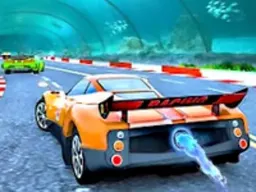
Blumgi Rocket
Blumgi Rocket is a free physics-based racing game you can play right now in your web browser on desktop or mobile without downloading anything. You pilot a rocket-powered car through colorful obstacle courses, launching yourself into the air with timed rocket boosts and pulling off mid-air stunts to blast through each level. The core loop is simple: rev your rocket engine, time your bursts for max
What Is This Game
Blumgi Rocket strips racing down to one focused mechanic: controlled rocket propulsion. You're not steering a car through a traditional track. Instead, you're managing a vehicle that responds to how long you hold down the rocket button, sending you careening forward with increasing force the longer you commit to the boost. The levels themselves are obstacle courses built into hillsides and mountain terrain, filled with slopes, tunnels, and architectural challenges that reward timing and precision. The game sits somewhere between a platformer and a driving game, leaning heavily on physics simulation to make each rocket burst feel consequential. When you launch into the air, you're not just floating there waiting to land. You can perform stunts mid-flight, and these actions apparently affect how quickly you complete each level. The progression system dangles cosmetic rewards in front of you: new vehicle skins and colored car designs unlock as you push through the campaign and finish increasingly difficult levels. The visual style leans into bright, eye-catching colors and what the developers call slow-motion animation effects during rocket bursts, giving big moments a sense of weight and impact.
Is It Worth Playing
Blumgi Rocket works if you want a quick burst of skill-based gameplay that doesn't demand hours of commitment. The appeal lives in the tension between simple controls and subtle difficulty. Your first few attempts feel like you're just smashing the rocket button and seeing what happens. Around attempt five, you start realizing that timing matters more than you thought: holding the boost for exactly two seconds instead of three changes where you land, whether you clear that tunnel, whether you slam into the next obstacle. That moment when the game clicks is real. The stunt system during flight adds another layer, suggesting there's depth beyond just raw rocket thrusts. For players who like racing games but find traditional car controls frustrating, this stripped-down approach removes the steering complexity and forces focus onto a single decision: when to fire. The unlockable vehicle skins give you reason to return and grind through tougher levels, even if you've already seen the core mechanics. If you bounce hard off physics-based driving games or need something more arcade-like, Blumgi Rocket's extreme simplification might feel limiting rather than liberating. But for anyone looking for a satisfying skill game with a clear difficulty curve, it's worth a few runs.
How to Get Started
Load Blumgi Rocket in your browser and you're immediately in a level. There's no menus to parse or story sequence to sit through. You see your rocket car positioned on terrain, and the game expects you to understand that the rocket button is your main tool. Your first instinct will be to hold it and see what happens, which is exactly right. You'll launch forward and probably crash into something almost instantly. That's the intended learning loop. Each attempt resets you to the start of the level, and you try again with a slightly better sense of how much thrust you need, where the obstacles actually sit, and whether you're supposed to clear them by going over or threading through them. The levels introduce new terrain types gradually: after you master the initial hill-and-tunnel setup, subsequent levels add steeper slopes, longer gaps to clear, and more complex layouts. The game doesn't pause or let you restart strategically mid-level. You either make it to the finish or you don't, then you're back at the start. This keeps runs short and failure quick, which means you spend less time frustrated and more time testing adjustments to your approach.
Controls
The control scheme is intentionally minimal. On desktop, you use W and S keys or the up and down arrow keys to control your rocket car. That's it. There's no steering wheel adjustment or brake pedal, just forward-and-backward throttle control. The rocket boost itself has its own button that you hold to charge power, though the exact key isn't specified in the base instructions. On mobile and touchscreen devices, the controls adapt to tap-and-hold input, letting you perform the same boosts by pressing and holding on the screen instead of pressing a key. The stunt system that triggers mid-flight presumably uses directional input while airborne, though the exact button mapping for stunts isn't detailed in the provided instructions. The beauty of this control setup is that it's accessible immediately: players who've never touched a racing game can pick up a controller or grab their phone and start moving within seconds. There's no muscle memory required, no complex combo chains to learn. You're reacting to what's on screen and deciding when to push the rocket button, not managing a dozen simultaneous inputs.
What Changes Over Time
Blumgi Rocket's long-term progression centers on two things: skill development and cosmetic unlocks. As you push through levels, the courses get harder. Early stages teach you the basics, but later levels demand precision you haven't needed yet. You start recognizing optimal launch angles, understanding exactly how much boost gets you over that gap without overshooting into the ceiling of the next tunnel, and timing stunts in mid-air to shave seconds off your completion time. Your brain learns the feel of the physics engine, and what felt random becomes predictable. The vehicle skins you unlock represent your major reward milestone. New colors, new designs, maybe new vehicle types appear as you complete levels and progress through the game. These don't change how the game plays, but they do give you something to chase beyond just faster times. The core mechanics never shift: you're still holding a boost button and timing launches. The game trusts that mastering the existing system at higher difficulty is enough depth to hold attention, rather than introducing new gimmicks every few levels. This approach works well for skill games, where the satisfaction comes from executing known techniques at increasingly higher precision.
Mistakes That Cost You
The most common mistake in Blumgi Rocket is treating every obstacle the same way. Your instinct is to rocket boost through everything, holding the button down harder when things look tight. In reality, different terrain sections require different approaches. Some gaps need a modest, controlled burst to clear cleanly. Others demand maximum power. The first few runs punish this mistake immediately: you'll boost into walls, overshooting openings and slamming into terrain you could have threaded through. Learning to read the level and adjust your input is what separates first-run attempts from completed runs. Another costly mistake is ignoring stunts. If performing mid-air maneuvers actually affects your completion time, neglecting them on early runs means you're not optimizing your approach. You might finish the level, but you're not finishing it as quickly as players who've learned the stunt timing. This becomes critical when levels get harder and time pressure increases. Timing the rocket boost incorrectly also costs you. Launching a fraction too early means you clip a ledge. Launching too late means you don't clear the next obstacle. The window of perfect timing is usually small, and the game doesn't give you feedback beyond success or failure. You have to develop feel through repetition, adjusting your timing by tiny increments until you nail the approach.
Where and What Device to Play On
Blumgi Rocket runs entirely in your web browser with no download or installation required. You can play it on desktop computers running any modern browser, and the game is fully optimized for mobile devices as well. Phones, tablets, everything works. The screen resolution is 800x600, which scales to fit whatever device you're on. That small native resolution means the game is lightweight and loads quickly, even on older hardware or shaky internet connections. The browser-based nature of the game means you can jump in instantly whenever you want: no launcher to open, no account to create, no waiting for files to download. Just visit the game page and play. This also means you can play on public computers, school systems, or any machine where you can open a web browser. There's no client software to install that might run afoul of institutional restrictions. The mobile optimization makes this especially convenient: Blumgi Rocket works as well on a phone during a lunch break as it does on a desktop with a keyboard. The touch controls are fully functional, giving you the same experience whether you're using keyboard keys or tapping your screen. This flexibility to play anywhere, on any device, whenever you have a browser open is a major advantage for casual, skill-based games like this one.
Controls
Keyboard and mouse
- W key or Up arrow: Move forward
- S key or Down arrow: Move backward
- Hold rocket button to charge boost (exact key not specified; typically Space or another designated key)
Touch
- Tap and hold screen to charge rocket boost
- Swipe or tap directions to control car movement
- Perform aerial stunts by swiping during flight (exact inputs vary by implementation)
FAQ
- How do I actually control the rocket car?
- On desktop, use W and S keys or up and down arrow keys to control your car's movement. On mobile or touchscreen, you tap and hold the screen. The rocket boost button charges power the longer you hold it down, and the longer you hold, the more powerfully you launch forward. There's no steering wheel: just forward, backward, and boost management.
- What are stunts and when do I do them?
- Stunts are aerial maneuvers you perform while your rocket car is mid-flight after a boost. Performing them apparently helps you complete levels faster. The exact timing and button inputs for stunts aren't detailed in the base instructions, so you'll discover the stunt mechanic through playing.
- Do I need to download or install anything to play?
- No. Blumgi Rocket is completely free and runs directly in your web browser. You can start playing immediately without any downloads, installations, or account creation.
- Can I play this on my phone?
- Yes. The game is fully optimized for mobile devices and works on phones and tablets. Touch controls replace the keyboard inputs, and the 800x600 resolution adapts to any screen size.
- What do vehicle skins do?
- Vehicle skins are cosmetic customizations that change the appearance of your car. They unlock as you progress through levels and complete challenges. They don't affect gameplay, only how your rocket car looks.
- Is there a story or campaign mode?
- Blumgi Rocket focuses on a progression of levels with increasing difficulty. You complete each level to unlock new stages and new vehicle skins. There's no traditional story narrative; the progression itself is the campaign.
- Why does my rocket car keep crashing?
- Timing your boost is everything. Too much power and you overshoot obstacles. Too little and you don't clear gaps. Early crashes are completely normal as you learn how much boost each section needs. Each run teaches you something about the level, so treat failures as practice runs.
- Who made Blumgi Rocket?
- Blumgi created Blumgi Rocket. The game's physics engine and level design reflect their focus on making rocket-based propulsion feel responsive and satisfying.
Similar games
More Racing Games games →